Server Side Rendering 🚧
Here is a page to talk about Angular Universal & Server Side Rendering.
This feature serves as an example and will not be merged along the core project neither maintained.
Link to feature
- SSR: Server-Side Rendering - rendering a client-side or universal app to HTML on the server.
- CSR: Client-Side Rendering - rendering an app in a browser, generally using the DOM.
- Rehydration: “booting up” JavaScript views on the client such that they reuse the server-rendered HTML’s DOM tree and data.
- Prerendering: running a client-side application at build time to capture its initial state as static HTML.
- TTFB: Time to First Byte - seen as the time between clicking a link and the first bit of content coming in.
- FP: First Paint - the first time any pixel gets becomes visible to the user.
- FCP: First Contentful Paint - the time when requested content (article body, etc) becomes visible.
- TTI: Time To Interactive - the time at which a page becomes interactive (events wired up, etc).
Read more details about the theory on this excellent article by Google Fundamentals.
There is a lot to cover here so this page is still in progress. 🚧
TTFB FCP FP DCL TTI Loaded
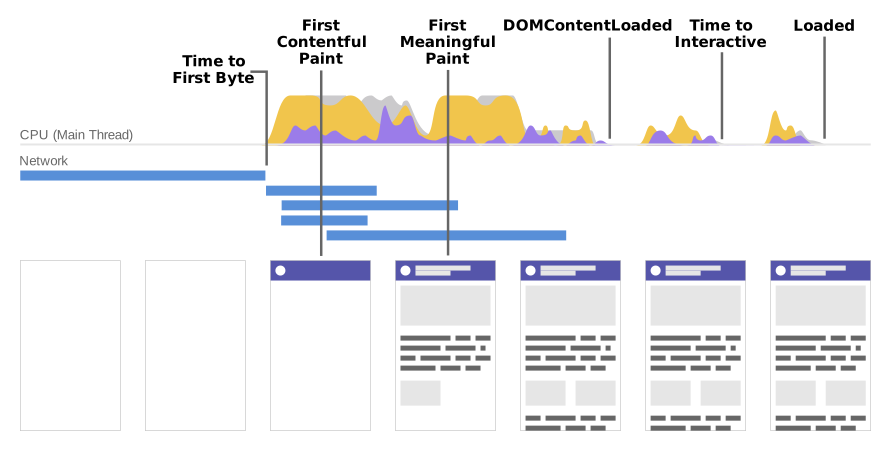

Server rendering generally produces a fast First Paint (FP) and First Contentful Paint (FCP). Running page logic and rendering on the server makes it possible to avoid sending lots of JavaScript to the client, which helps achieve a fast Time to Interactive (TTI). This makes sense, since with server rendering you’re really just sending text and links to the user’s browser. However, there is one primary drawback to this approach: generating pages on the server takes time, which can often result in a slower Time to First Byte (TTFB).
A normal Angular application executes in the browser, rendering pages in the DOM in response to user actions. Angular Universal executes on the server, generating static application pages that later get bootstrapped on the client. This means that the application generally renders more quickly, giving users a chance to view the application layout before it becomes fully interactive.
There are three main reasons to create a Universal version of your app.
- Facilitate web crawlers through search engine optimization (SEO)
- Improve performance on mobile and low-powered devices
- Show the first page quickly with a first-contentful paint (FCP)
Any web server technology can serve a Universal app as long as it can call Universal's renderModule() function.
The renderModule() function takes as inputs a template HTML page (usually index.html), an Angular module containing components, and a route that determines which components to display. The route comes from the client's request to the server.
Each request results in the appropriate view for the requested route. The renderModule() function renders the view within the tag of the template, creating a finished HTML page for the client.
Finally, the server returns the rendered page to the client.