feat: added app lifecycle page #5186
There are no files selected for viewing
This file contains hidden or bidirectional Unicode text that may be interpreted or compiled differently than what appears below. To review, open the file in an editor that reveals hidden Unicode characters.
Learn more about bidirectional Unicode characters
| Original file line number | Diff line number | Diff line change |
|---|---|---|
| @@ -0,0 +1,193 @@ | ||
| --- | ||
| title: The application lifecycle | ||
| weight: 3 | ||
| description: "Understand the {{% vendor/name %}} application lifecycle and learn how to use web commands and hooks to control app behavior" | ||
| --- | ||
| <!-- vale off --> | ||
|
|
||
| Hooks and web commands let you automate and control different stages of your [application’s lifecycle](#lifecycle-overview). | ||
|
|
||
| - **Web commands** (`pre_start`, `start`, `post_start`) run **on every instance**, every time that instance starts. They ensure each container is correctly initialised before it receives traffic, including during [horizontal](/manage-resources/adjust-resources.html#horizontal-scaling) autoscaling. | ||
|
|
||
| - **Hooks** (`build`, `deploy`, `post_deploy`) run **once per deployment**, on a single instance. They are used for environment-wide tasks such as preparing the image, running database migrations, or triggering background jobs. | ||
|
|
||
| Together, hooks and web commands give you fine-grained control of the application lifecycle, ensuring smooth start-up, reliable [autoscaling](/manage-resources/autoscaling.html), and safe deployments. | ||
|
|
||
| ## Lifecycle overview | ||
|
|
||
| The {{% vendor/name %}} deployment lifecycle has two parallel tracks: | ||
|
|
||
| - Deployment process (runs once per deployment) | ||
| This is where your environment is built, deployed, updated, and released. | ||
| - Instance startup process (runs on every container instance) | ||
| Each new application instance goes through its own startup steps before it can receive traffic. | ||
|
|
||
| Understanding how these two tracks interact helps you choose the right hook for each task. | ||
|
|
||
| ### Deployment Lifecycle (Environment-level) | ||
|
|
||
| These steps run once per deployment, no matter how many instances you have: | ||
|
|
||
| - `build` → Create the application image | ||
| - `deploy` → Run blocking environment-wide tasks before going live | ||
| - `post-deploy` → Run safe, non-blocking background tasks after the deployment is live | ||
|
|
||
| [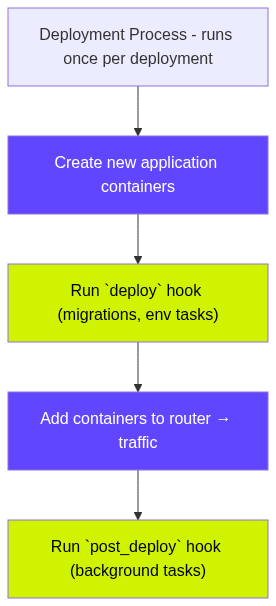](https://mermaid.live/edit#pako:eNplkt2O0zAQhV9l5L0BKa3c_NEECalN1DskhPYKglhjTxqrjh05zpal6i0PwCPyJDhpWoq48xyd74w94xPhRiDJSa3MkTfMOngsKw3wSD9XpMROmZcWtYMP1nDse1iAHXQPRnOEDi2Im6UiXyp9QWGxeAcbH1BYZA5B4xFY1ynJmZNGAzfaManR9hMEsJmIrSc-DhqeLqFP0BhzgFet3NuJ6wNA_QyO9Yf-9UxuJ7Lw5EaIu2BwBqwZnL_i75-_wFlW15LPUDFB5bVdZ3r39d-e3xg_7D2vxX27keWK-TFs4Fkahe7tX2kLSrZ4JxT_e8qr5yaVWM82qKVS-UNK43S3C7hRxubHRrq7yNE8BszWku4iGs7WB0qpd5KA7K0UJHd2wIC0aFs2luQ0plTENdhiRXJ_FFizQfm9VfrssY7pT8a0V9I_ft-QvGaq99XQCb_IUjK_ivamWtQCbeHH5EierqYMkp_Id5KH8XqZrsJkHa2TlIZRFJAXkkfxck2TMKSrLI3DMKLxOSA_pq50-SYNkyxOs2ydZOkq83EopDP2_eWHTh_1_AfE39-r) | ||
|
|
||
| This lifecycle details the kind of work that affects the entire environment, such as migrations, asset compilation, cache resets, and index updates. | ||
|
|
||
| ### Instance Startup Lifecycle (per-instance) | ||
|
|
||
| Every application container goes through the following before it can handle traffic: | ||
|
|
||
| - `pre_start` → Quick per-instance setup | ||
| - `start` → Launch the application (traffic is blocked until this completes) | ||
| - `post_start` → Warm-up tasks before instance is added to router | ||
|
|
||
| [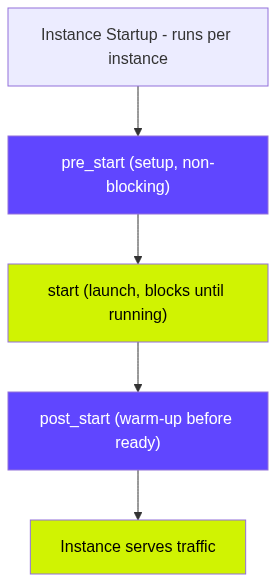](https://mermaid.live/edit#pako:eNplkk2L2zAQQP_KMHtpwQ6Kv2q7UNjEBHroqXtqXYrWHseismQkedNtyH-v7HXSQG-a0XszGkZnbHRLWGIn9anpuXHwVNUK4Il9r_Gzso6rhuCr8zfTCCGYSVkYyYBY72r8Uas3A8LwEzx6bzT0084KvLPkvQCUVuGz1M0voY7vFwXgceF3nl9ZySfV9AEsoIVJOSHnhupO2i3Sfm6irbt2OXEzhP59z9RpQ2CIt69XY78Y1f04lswLWXCGd51obhM0klvrn_UitCT38V9qB1IMdJfY_89UV-aWqqhbMeiElOVDxpLscAgaLbUpT71wdyVneC6wohU7xCxa0QfGmCcxwKMRLZbOTBTgQGbgc4jnuUqNrqfBr6P0x5Y6PklXY60uXhu5-qb1cDWNno49lh2X1kfT2HJHleBHw4db1pBqyey1XwKWUbrUwPKMv32U5JtsG6V5nKcZi-I4wFcs42STszSK2LbIkiiKWXIJ8M_SlW0-ZFFaJFlR5GmRbYttgNQKp82Xt8-3_MHLX2fu0Mg) | ||
|
|
||
| This is the work that every instance must do to be ready for traffic, like preparing local caches, installing runtime files, or loading ML models. | ||
|
|
||
| ## Web commands | ||
|
|
||
| Each web application on {{% vendor/name %}} can define web commands inside its `.upsun/config.yaml` file: | ||
|
|
||
| ```yaml | ||
| applications: | ||
| myapp: | ||
| type: 'python:3.13' | ||
| web: | ||
| commands: | ||
| pre_start: "./scripts/setup.sh" | ||
| start: "uwsgi --ini conf/server.ini" | ||
| post_start: "./scripts/warm-up.sh" | ||
| ``` | ||
|
|
||
| | Name | Type | Required | Blocks Traffic | Description | | ||
| | -------------- | ------ | -------- | --------------------- | --------------------------------------------------------------------------------------------------------------------------------------------------------- | | ||
| | **pre_start** | string | No | No | Runs before `start`. Ideal for short per-instance setup tasks, such as preparing local caches or setting file permissions. | | ||
| | **start** | string | Yes | Yes (until running) | The main command that launches your app. Traffic is blocked until this command successfully runs. If it exits, {{% vendor/name %}} restarts the instance. | | ||
| | **post_start** | string | No | Yes (until completed) | Runs after the app starts but before the instance is added to the router. Use for warm-up tasks that must complete before serving traffic. | | ||
|
|
||
| For more information about web commands, visit the [Single-runtime Image page](/create-apps/app-reference/single-runtime-image.html#web-commands). | ||
|
|
||
| {{< note theme="info" title="Blocking vs. non-blocking commands" >}} | ||
|
|
||
| A command is blocking if an instance cannot receive traffic until it completes successfully. | ||
|
|
||
| - `start` blocks traffic until the application is running. | ||
| - `post_start` blocks traffic until all warm-up tasks complete. | ||
| - `pre_start` is non-blocking. | ||
|
||
|
|
||
| These rules apply only to instance startup, not to deployments. | ||
|
|
||
| {{< /note >}} | ||
|
|
||
| ## Web comannd use cases | ||
|
||
|
|
||
| | Command | When to use | Example task | | ||
| | -------------- | ---------------------------------------- | ------------------------------------------- | | ||
| | **pre_start** | Per-instance setup before app launch | Preparing local caches, setting permissions | | ||
| | **post_start** | Warm-up before instance receives traffic | Cache priming, loading dependencies | | ||
|
||
|
|
||
| ## Deploy and `post_deploy` hooks | ||
|
|
||
| While [web commands](#web-commands) run on every instance during startup, deployment-level hooks run only once per deployment, on a single container. They do not run during [horizontal](/manage-resources/adjust-resources.html#horizontal-scaling) autoscaling or instance restarts. | ||
|
|
||
| Use `build`, `deploy`, and `post_deploy` for image preparation, environment-wide tasks, or background jobs that should run per-deployment. | ||
|
|
||
| Define hooks in `.upsun/config.yaml`: | ||
|
|
||
| ```yaml | ||
| applications: | ||
| myapp: | ||
| type: "python:3.13" | ||
| hooks: | ||
| build: "pip install -r requirements.txt" | ||
| deploy: "./scripts/migrate.sh" | ||
| post_deploy: "./scripts/warm-cache.sh" | ||
| ``` | ||
|
|
||
| | Hook | When it runs | Blocks traffic | Purpose | | ||
| |---------------|---------------------------------------------------|----------------|--------------------------------------------------------------| | ||
| | **build** | During the image build (before deployment) | N/A | Install dependencies, compile assets, prepare the runtime image | | ||
| | **deploy** | After new containers start but before they serve traffic | Yes | Environment-wide tasks that must complete before the new version goes live | | ||
| | **post_deploy** | After deployment is live and serving traffic | No | Non-blocking background work safe to run after the deployment completes | | ||
|
|
||
| ### `deploy` | ||
|
|
||
| `deploy` runs once per deployment, **never** per instance. Because it blocks traffic until it completes, use it only for tasks that must finish before the application is switched over. | ||
|
|
||
| {{< note theme="note" title="Keep deploy short" >}} | ||
|
|
||
| Long-running deploy tasks slow down releases and may cause timeouts. | ||
|
|
||
| {{< /note >}} | ||
|
|
||
| ### `post_deploy` | ||
|
|
||
| `post_deploy` runs after the deployment is successful and traffic has already switched to the new version. Use it for background tasks that don’t need to block deployment. | ||
|
|
||
| {{< note theme="info" title="Runs on every redeploy" >}} | ||
|
|
||
| `post_deploy` runs on every redeploy (even without code changes). It’s ideal for tasks triggered by: | ||
|
|
||
| - configuration changes | ||
| - new or updated environment variables | ||
| - dependency or service updates | ||
|
|
||
| {{< /note >}} | ||
|
|
||
| ## Deploy and `post_deploy` use cases | ||
|
|
||
| | Hook | When to use | Example task | | ||
| |-----------------|------------------------------------------------------|--------------------------------------------------| | ||
| | **deploy** | Environment-wide tasks that must run before traffic | Database migrations, index updates | | ||
| | **post_deploy** | Background tasks safe while serving traffic | CDN cache clearing, cache warming, notifications | | ||
|
|
||
| ### Autoscaling example | ||
|
|
||
| When autoscaling [adds new instances](/manage-resources/autoscaling.html#thresholds), only web commands run, not `deploy` or `post_deploy`. Each new instance must run `start` and `post_start` before receiving traffic. | ||
|
|
||
| Good uses for post_start during scaling include: | ||
|
|
||
| - Cache priming or session loading | ||
| - Lightweight readiness checks | ||
| - Loading configuration or dependencies into memory | ||
|
|
||
| This ensures new instances are ready before the router adds them. | ||
|
|
||
| {{< note theme="tip" title="Autoscaling" >}} | ||
|
|
||
| For more information about Autoscaling, visit the [Autoscaling docs page](/manage-resources/autoscaling.html). | ||
|
|
||
| {{< /note >}} | ||
|
|
||
| ### Zero-downtime example | ||
|
|
||
| If your [application takes longer to become responsive](/learn/overview/build-deploy.html#application-is-slow-to-start), traffic might be switched back to your original application before it’s fully ready. This can cause temporary errors immediately after deployment. | ||
|
|
||
| `post_start` can help co-ordinate so the app receives traffic only when it’s fully ready. An example of a `post_start` command waiting for your application would be: | ||
|
|
||
| ``` | ||
| web: | ||
| commands: | ||
| post_start: | | ||
| date | ||
| curl -sS --retry 20 --retry-delay 1 --retry-connrefused localhost -o /dev/null | ||
| ``` | ||
| {{< note theme="info" title="Zero Downtime Deployment" >}} | ||
|
|
||
| For more information about Zero Downtime Deployment, visit the [build deploy documentation page](/learn/overview/build-deploy.html#zero-downtime-deployments). | ||
|
|
||
| {{< /note >}} | ||
|
|
||
| ## Related content | ||
|
|
||
| - [Build and Deploy overview](/learn/overview/build-deploy.html) | ||
| - [Autoscaling](/manage-resources/autoscaling.html) | ||
| - [Single-runtime Image reference](/create-apps/app-reference/single-runtime-image.html#web-commands) | ||
| - [Zero-downtime deployments](/learn/overview/build-deploy.html#zero-downtime-deployments) | ||
|
|
||
|
|
||
| <!-- vale on --> | ||

Oops, something went wrong.
Add this suggestion to a batch that can be applied as a single commit.
This suggestion is invalid because no changes were made to the code.
Suggestions cannot be applied while the pull request is closed.
Suggestions cannot be applied while viewing a subset of changes.
Only one suggestion per line can be applied in a batch.
Add this suggestion to a batch that can be applied as a single commit.
Applying suggestions on deleted lines is not supported.
You must change the existing code in this line in order to create a valid suggestion.
Outdated suggestions cannot be applied.
This suggestion has been applied or marked resolved.
Suggestions cannot be applied from pending reviews.
Suggestions cannot be applied on multi-line comments.
Suggestions cannot be applied while the pull request is queued to merge.
Suggestion cannot be applied right now. Please check back later.
There was a problem hiding this comment.
Choose a reason for hiding this comment
The reason will be displayed to describe this comment to others. Learn more.
Sorry you forgot to remove the "Blocks Traffic" column on this table