


Profile Rust code with samply, without remembering the build/run ceremony.
Important: This project is not affiliated with, endorsed by, or maintained by the official
samplyproject or its authors. It is an independent Cargo subcommand that integrates with thesamplyprofiler.
cargo samply automates the usual profiling workflow:
- Builds your project (optionally with a custom Cargo profile)
- Runs the resulting artifact under the
samplyprofiler - Supports binaries, examples, benchmark, and test targets
- Automated "Profile Ceremony": It handles the
[profile.samply]management for you, ensuring optimized code with debug symbols without manualCargo.tomledits. - Unified Target Selection: No more hunting for compiled artifacts in
target/release/examples/.... Just use--bin,--example,--bench, or--test. - Smart Benchmark Handling: Automatically injects the correct runtime flags (like
--bench) for Criterion-style benchmarks, which are often missed when profiling manually. - Proactive Validation: Checks for
samplyinstallation before starting the build, so you find out immediately if something is missing. - Lower Friction: By making profiling a single command, it encourages frequent performance checks throughout development.
- A working Rust toolchain (via
rustup) samplyinstalled and available in yourPATH
cargo install cargo-samply
cargo install samplycargo install --git https://github.com/PhilippPolterauer/cargo-samply.gitFrom any Rust project:
$ cargo samplyOnce samply starts its local UI server, open the printed address (typically 127.0.0.1:3001).
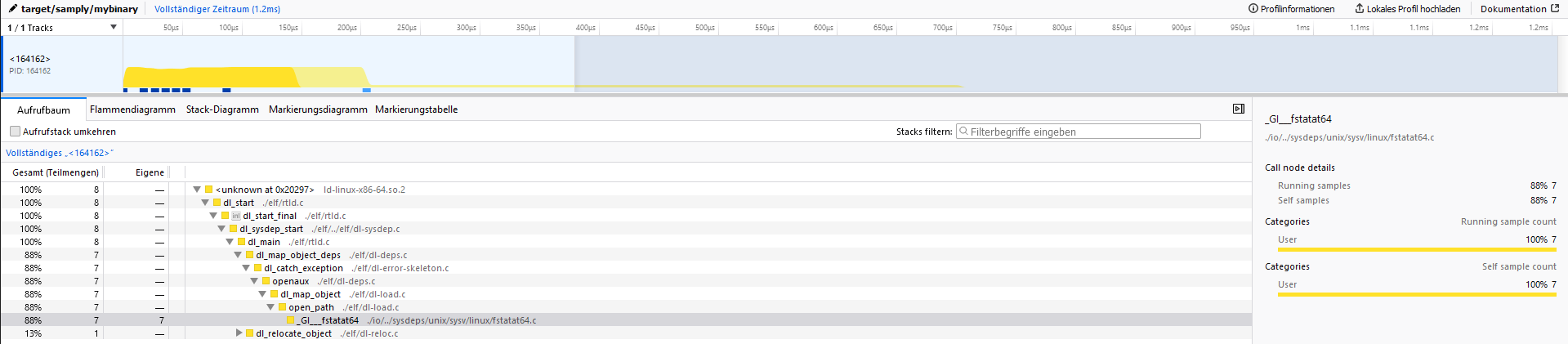
$ cargo samply --help
The samply subcommand

Usage: cargo samply [OPTIONS] [TRAILING_ARGUMENTS]...

Arguments:
  [TRAILING_ARGUMENTS]...  Trailing arguments passed to the binary being profiled

Options:
      --profile <PROFILE>          Build with the specified profile [default: samply]
  -p, --package <PACKAGE>          Package to profile (in a workspace)
  -b, --bin <BIN>                  Binary to run
  -e, --example <EXAMPLE>          Example to run
      --bench <BENCH>              Benchmark target to run (e.g. `cargo samply --bench throughput`)
      --test <TEST>                Test target to run (e.g. `cargo samply --test integration_test`)
      --bench-flag <BENCH_FLAG>    The flag to use when running the benchmark target [default: --bench]
      --samply-args <SAMPLY_ARGS>  Arguments to pass to samply (e.g. `--samply-args "--rate 2000"`)
  -f, --features <FEATURES>        Build features to enable
      --no-default-features        Disable default features
  -v, --verbose                    Print extra output to help debug problems
  -q, --quiet                      Suppress all output except errors
  -n, --no-samply                  Disable the automatic samply start
      --dry-run                    Print the build and run commands without executing them
      --no-profile-inject          Do not modify Cargo.toml to add the samply profile
      --list-targets               List all available targets in the workspace and exit
  -h, --help                       Print help
-V, --version Print version# Profile the default binary target
cargo samply
# Profile a specific binary
cargo samply --bin my-binary
# Profile an example
cargo samply --example my-example
# Profile a benchmark (Criterion harness validated)
cargo samply --bench throughput -- --sample-size 10
# Profile an integration test
cargo samply --test my_integration_test
# Build using a different profile
cargo samply --profile release
# Enable specific features
cargo samply --features feature1,feature2
# Disable default features
cargo samply --no-default-features
# Pass arguments to the program being profiled
cargo samply -- arg1 arg2 --flag value
# Pass arguments to samply (e.g., set sample rate)
cargo samply --samply-args "--rate 2000" --bin my-binary
# Run without starting samply (useful for debugging build/target selection)
cargo samply --no-samply- When you use
--bench <name>,cargo-samplyprefixes the runtime invocation with--bench(mirroringcargo bench). - This behavior has been validated with Criterion-driven benches only; other harnesses/runners may require manual adjustments.
- Benchmark targets must be referenced by their exact Cargo target name (no suffix rewriting or aliasing is performed).
- When you use
--test <name>,cargo-samplybuilds the test binary in test mode and runs it for profiling. - This is useful for profiling integration tests or test scenarios that exercise specific code paths.
Profile integration tests or test binaries:
cargo samply --test integration_suitePass additional arguments directly to samply:
# Set sample rate
cargo samply --samply-args "--rate 2000" --bin my-binary

# Pass multiple samply options
cargo samply --samply-args "--rate 2000 --save-only profile.json" --bin my-binaryIn a workspace with multiple packages, specify which package to profile:
cargo samply -p my-package --bin my-binaryUse --dry-run to preview the build and run commands without executing them:
cargo samply --dry-run --bin my-binaryThis prints the cargo build invocation and the samply record command that would be executed, along with any environment variable overrides.
By default, benchmark targets are invoked with --bench (as Criterion expects). For custom harnesses, you can override this:
# Use a custom flag
cargo samply --bench throughput --bench-flag=--my-custom-flag

# Disable flag injection entirely
cargo samply --bench throughput --bench-flag=noneTo see all available binaries, examples, and benchmarks in the workspace:
cargo samply --list-targetsBy default, cargo-samply adds a [profile.samply] section to your Cargo.toml to ensure optimized builds with debug symbols. To prevent this modification:
cargo samply --no-profile-injectNote: If the profile is missing, the build may fail or produce binaries without debug symbols.
| Variable | Description |
|---|---|
CARGO_SAMPLY_SAMPLY_PATH |
Override the path to the samply binary (default: uses samply from PATH). |
CARGO_SAMPLY_NO_PROFILE_INJECT |
If set (any non-empty value), prevents modification of Cargo.toml. Equivalent to --no-profile-inject. |
CARGO_SAMPLY_NO_SYSROOT_INJECTION |
If set, disables automatic injection of Rust sysroot library paths into LD_LIBRARY_PATH/DYLD_LIBRARY_PATH/PATH. Useful if you manage library paths manually. |
This project includes a justfile for common development tasks. Install just and use:
# Run tests (matches CI configuration)
just test

# Update test snapshots when needed
just test-overwrite

# Clean all target directories
just clean-all

# Clean only test project target directories
just clean

# Clean only main project
just clean-mainThe project uses trycmd for integration testing, which validates CLI behavior against snapshot files.
When making changes that affect command output:
- Run
just test - If output changed intentionally, run
just test-overwrite - Review the snapshot diffs in git
Issues and PRs are welcome.
- Fork the repository
- Create a feature branch
- Make your changes
- Run
just test - Open a pull request