
Here are some of the highlights:
- Devise views with Bootstrap 3.
- Used Bootstrap responsive columns.
- I18n Support.
WARNING: This gem copies lots of its code from devise-i18n-views gem.
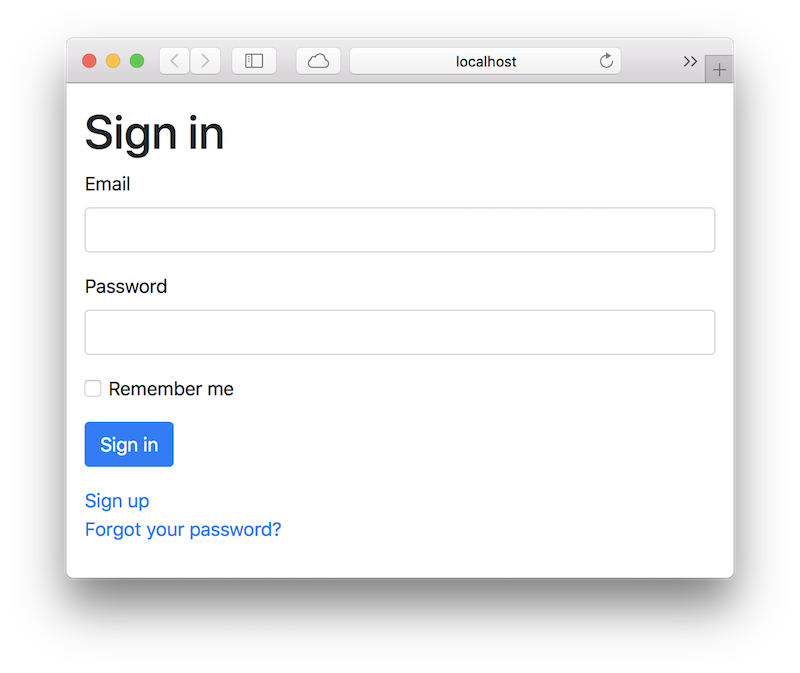
Add these lines in the head tag of your application.html.erb:
<link rel="stylesheet" href="//maxcdn.bootstrapcdn.com/bootstrap/3.0.3/css/bootstrap.css">
<link rel="stylesheet" href="//maxcdn.bootstrapcdn.com/bootstrap/3.0.3/css/bootstrap-theme.css">
Add this line to your application's Gemfile:
gem 'devise-bootstrap-views'
And then execute:
$ bundle
Add some minor css fix to your rails asset pipeline manifest
# SASS
*= require devise_bootstrap_views

# LESS
*= require devise_bootstrap_views_less
Then you need to install the required translations in your config/locales. The devise-i18n-views project is no longer maintained after being merged into devise-i18n, which is currently the best source for updated Devise translations. You can manually download locale dictionaries from devise-i18n/rails/locales or generate them by running devise:views:locale <chosen_locale>:
rails g devise:views:locale itwill generate config/locales/devise.views.it.yml.
The devise:views:bootstrap_templates generator will copy all views to your application, so you can modify the files as you wish:
rails g devise:views:bootstrap_templatesAlternatively, you can also generate Haml or Slim templates instead of traditional ERB. Both can be generated with their respective commands below.
rails g devise:views:bootstrap_haml_templatesrails g devise:views:bootstrap_slim_templatesSample Application can be found at this link - Devise Boostrap Views Application
- Fork it ( https://github.com/hisea/devise-bootstrap-views/fork )
- Create your feature branch (
git checkout -b my-new-feature) - Commit your changes (
git commit -am 'Add some feature') - Push to the branch (
git push origin my-new-feature) - Create a new Pull Request