04. Using the library
The core library shares the name of this repository. The library has modules for inputting various video sources (both event-based and frame-based), and transcoding them to the ADΔER representation with shared functions. The goal is to abstract away the nitty-gritty details and make it easier to build applications which leverage this representation. Then, any video sources which gain support in the library down the line will automatically (or at least, trivially) be supported in any applications which depend on this library. Neat!
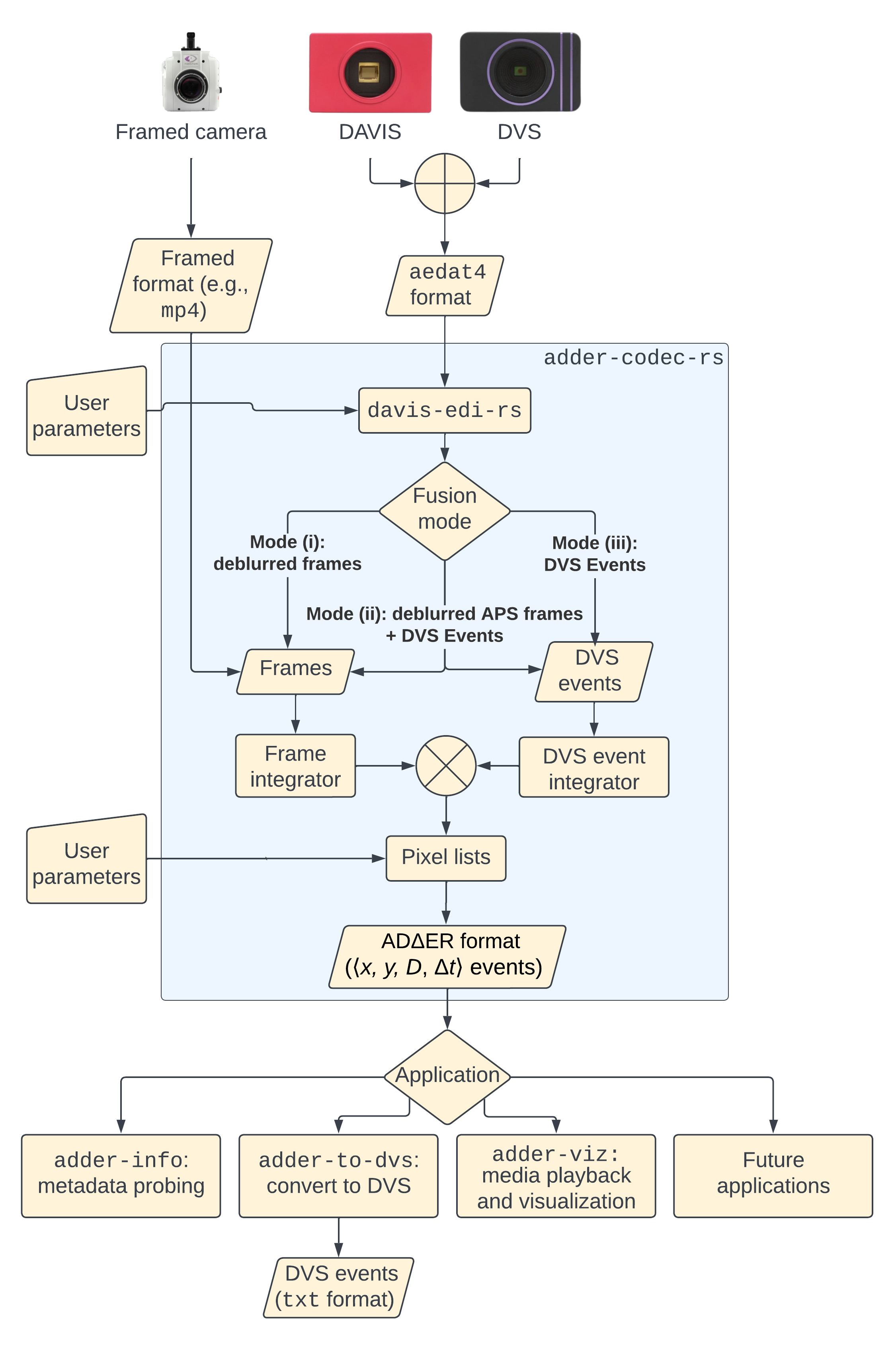
If you just want to use the hooks for encoding/decoding ADΔER streams (i.e., not a transcoder for producing the ADΔER events for a given source), then you can include the library by adding the following to your Cargo.toml file:
adder-codec-rs = {version = "*", features = ["raw-codec"]}
If you want to use the provided transcoder(s), then you have to install OpenCV 4.0+ according to the configuration guidelines for opencv-rust. Then, include the library in your project as normal:
adder-codec-rs = "*"
Clone this repository to run examples provided in /examples and /src/bin
We can transcode an arbitrary framed video to the ADΔER format. Run the program /examples/framed_video_to_adder.rs. You will need to adjust the parameters for the FramedSourceBuilder to suit your needs, as described below.
 let mut source =
        // The file path to the video you want to transcode, and the bit depth of the video
        FramedSourceBuilder::new("~/Downloads/excerpt.mp4".to_string(),
                                 SourceCamera::FramedU8)

        // Which frame of the input video to begin your transcode
        .frame_start(1420)

	// How many rows of event pixels per chunk. Chunks are distributed between the number of available threads.
	.chunk_rows(64)

        // Input video is scaled by this amount before transcoding
        .scale(0.5)

        // Must be true for us to do anything with the events
        .communicate_events(true)

        // The file path to store the ADΔER events
        .output_events_filename("~/Downloads/events.adder".to_string())

        // Use color, or convert input video to grayscale first?
        .color(false)

        // Positive and negative contrast thresholds. Larger values = more temporal loss. 0 = nearly no distortion.
        .contrast_thresholds(10, 10)

        // Show a live view of the input frames as they're being transcoded?
        .show_display(true)

        .time_parameters(5000,  // The reference interval: How many ticks does each input frame span?
                         300000,    // Ticks per second. Must equal (reference interval) * (source frame rate)
                         3000000)   // Δt_max: the maximum Δt value for any generated ADΔER event
        .finish();
We can also transform our ADΔER file back into a framed video, so we can easily view the effects of our transcode parameters. Run the program /examples/events_to_instantaneous_frames.rs. You will need to set the input_path to point to an ADΔER file, and the output_path to where you want the resulting framed video to be. This output file is in a raw pixel format for encoding with FFmpeg: either gray or bgr24 (if in color), assuming that we have constructed a FrameSequence<u8>. Other formats can be encoded, e.g. with FrameSequence<u16>, FrameSequence<f64>, etc.
To take our raw frame data and encode it in a standard format, we can use an FFmpeg command as follows:
ffmpeg -f rawvideo -pix_fmt gray -s:v 960x540 -r 60 -i ./events.adder -crf 0 -c:v libx264 -y ./events_to_framed.mp4
This is the most thorough example, complete with an argument parser so you don't have to edit the code. Run the program /src/bin/adder_simulproc.rs, like this:
cargo run --release --bin adder_simulproc --
    --scale 1.0
    --input-filename "/path/to/video"
    --output-raw-video-filename "/path/to/output_video"
    --c-thresh-pos 10
    --c-thresh-neg 10
The program will re-frame the ADΔER events as they are being generated, without having to write them out to a file. This lets you quickly experiment with different values for c_thresh_pos, c_thresh_neg, ref_time, delta_t_max, and tps, to see what effect they have on the output.
Encode a raw stream:
let mut stream: RawStream = Codec::new();
match stream.open_writer("/path/to/file") {
    Ok(_) => {}
    Err(e) => {panic!("{}", e)}
};
stream.encode_header(500, 200, 50000, 5000, 50000, 1);

let event: Event = Event {
        coord: Coord {
            x: 10,
            y: 30,
            c: None
        },
        d: 5,
        delta_t: 1000
    };
let events = vec![event, event, event]; // Encode three identical events, for brevity's sake
stream.encode_events(&events);
stream.close_writer();
Read a raw stream:
let mut stream: RawStream = Codec::new();
stream.open_reader(args.input_filename.as_str())?;
stream.decode_header();
match self.stream.decode_event() {
    Ok(event) => {
        // Do something with the event
    }
    Err(_) => panic!("Couldn't read event :("),
};
stream.close_reader();