Releases: naninovel/docs
Naninovel 1.19

Note
Release notes: https://naninovel.com/releases/1.19
Naninovel 1.18
Note
Release notes: https://naninovel.com/releases/1.18
Naninovel 1.17
Compatibility
Supported Unity versions range: from 2019.4.30 to 2021.2. Previous versions are not supported; compatibility issues with newer (major) versions will be addressed once they're out of beta.
Recommended Unity version: 2019.4.30.
Upgrade Guide
When importing the package to a project with Naninovel version 1.15 or older first follow v1.16 release upgrade guide, then continue with the following instructions:
- Remove
Naninovelfolder from the project before importing the updated package. - In case using extension packages, update them: Spreadsheet, Live2D, Spine, Inventory, PlayMaker, AdventureCreator.
- In case using message sound option for characters, select the playback type with the newly added
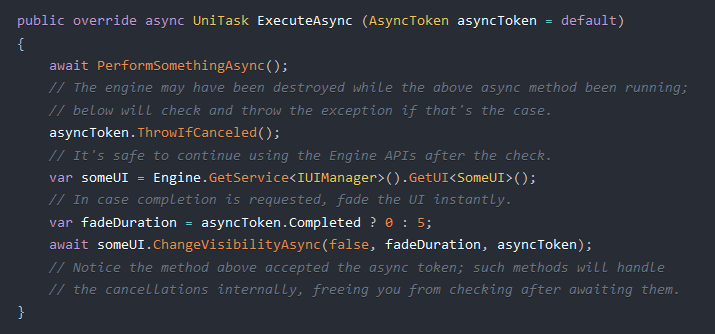
Message Sound Playbackoption. - In case using engine's async APIs (eg, custom commands), change
CancellationTokentoAsyncToken. (example) - In case using
Reveal SFXin a text printer, use either the newly addedOn Reveal StartedandOn Reveal Finishedevents (example) orChars SFXproperty. - Remove
UniRx.Asyncusings from custom async C# scripts (they're no longer required to referenceUniTasktypes).

Remember to keep NaninovelData folder when updating the engine to preserve project configuration and asset references.
Be aware, that in-game saves (slots in save/load menu, values in settings menu and global game state) created with previous versions could cause unexpected behavior when loaded with the updated version; when patching a shipped project with a new Naninovel version, make sure existing saves work as expected.
In case using VS Code IDE extension, check for updates.
Added
- Added audio support for video actors.
- Added
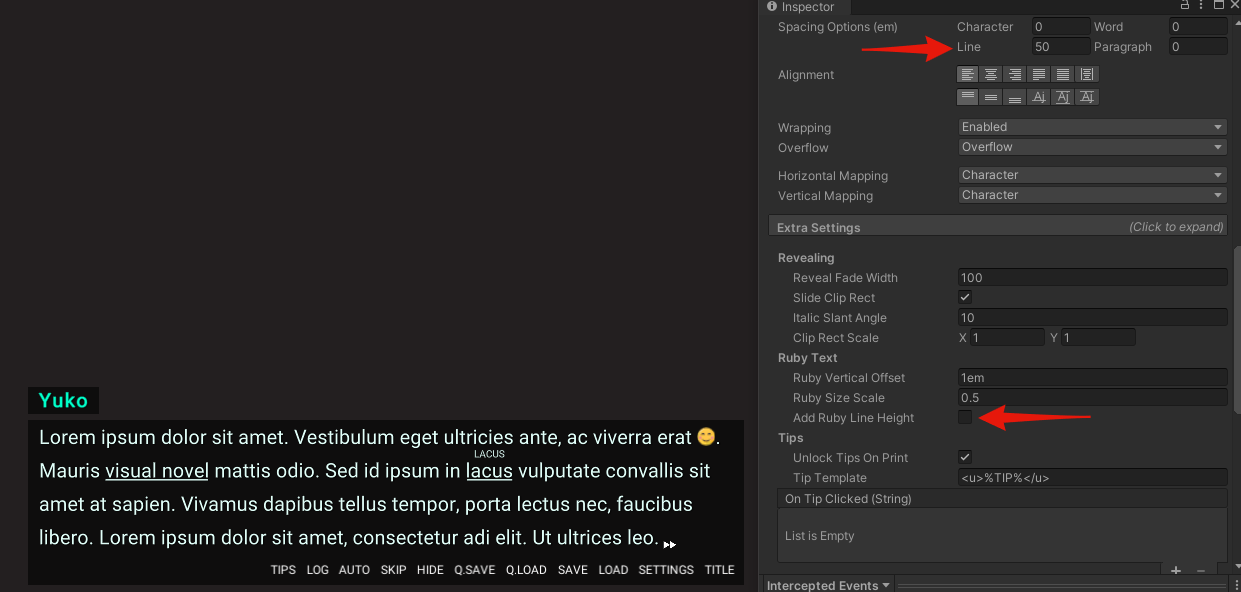
Add Ruby Line Heightproperty to Naninovel TMPro Text component allowing to disable auto line height compensation for the lines that contain ruby text. Disable and increase default text line height to ensure equal height for all lines when using ruby tags. (example) - Added
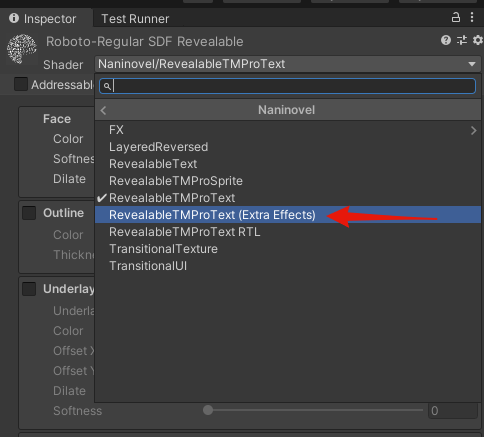
RevealableTMProText (Extra Effects)revealable shader for TMPro text based on full SDF shader bundled with TMPro (the default one is based on mobile version). (example) - Added
Authored Templateproperty to text printer actor configuration allowing to specify processing for printed text messages with an author (direct speech). (guide) - Added
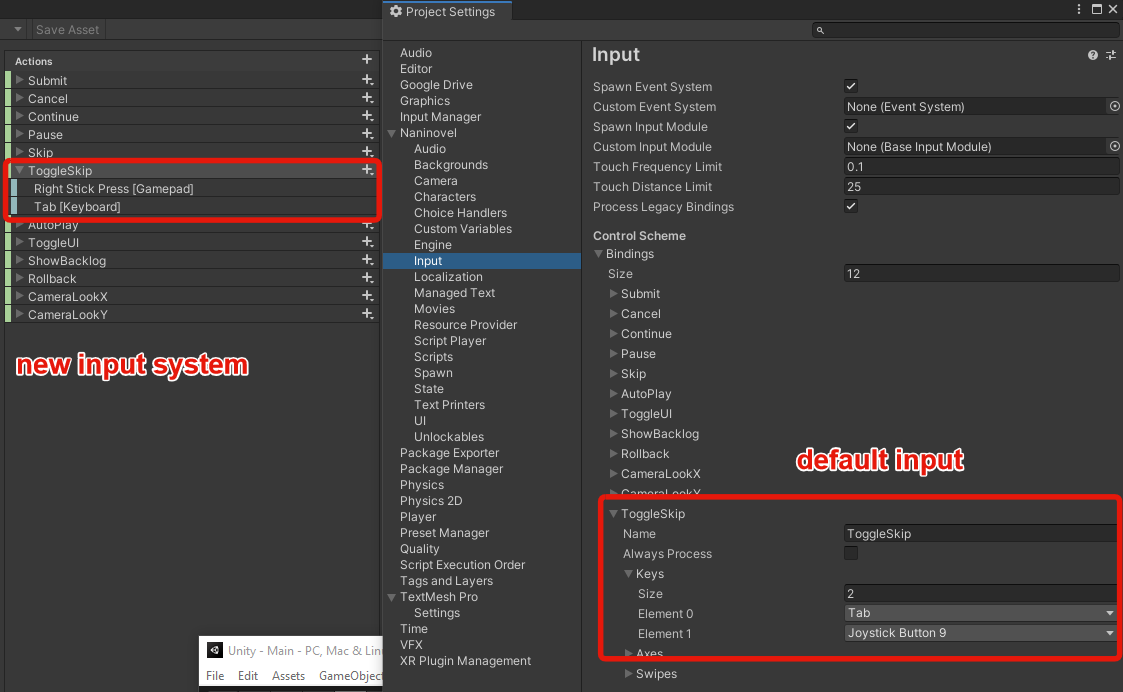
Toggle Skipdefault input allowing to toggle skip input mode; default bindings are Tab on keyboard and right stick press on gamepad. To use the input in existing projects, add the binding in input configuration or input actions asset when using new input system. (example) - Added
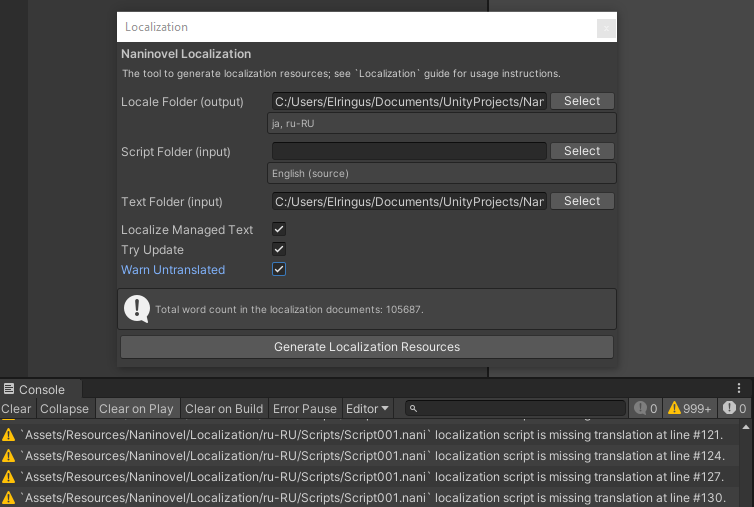
Warn Untranslatedoption to localization utility. When enabled and generating documents withTry Updateenabled, will log warnings when untranslated lines are found. (example) - Added invert option to custom transition. To invert, specify
1as second parameter, eg:@back Appearance.Custom dissolve:Textures/Spiral params:,1. - Added
timeparameter to@moviecommand allowing to control the fade-in/out duration. - Added
Message Sound Playbackoption to character metadata configuration allowing to select the sound playback type (looped, one shot or clipped). - Added universal serialization handlers (selected by default in new projects).
- Added
Engine.OnDestroyedevent invoked when the engine is destroyed. - Added
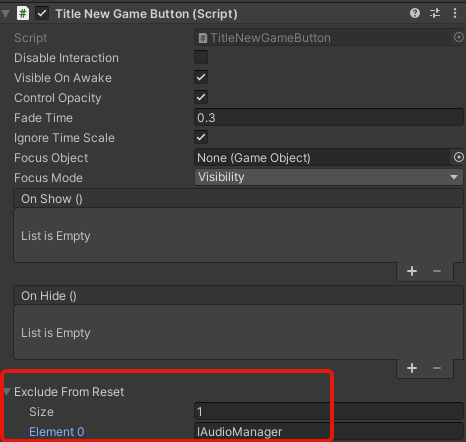
Exclude From Resetproperty to new game button of default title UI, allowing to exclude specific engine services from state reset when starting a new game. (example) - Added
On Reveal StartedandOn Reveal FinishedUnity events to the text printers. (example) - Added an option for the text char reveal routines (char commands and char sfx) to trigger on any char; leave
Charactersfield empty for that. - Added
On UnlockedandOn LockedUnity events toUnlockable Triggercomponent. - Added
Wait By Defaultoption to script player configuration allowing to control whether the player should wait the played commands whenwaitparameter is not explicitly specified. - Added
Deleteinput binding (delete keyboard and gamepad pause button by default) and an option to delete save-load slots with a gamepad and keyboard. (example) - Added
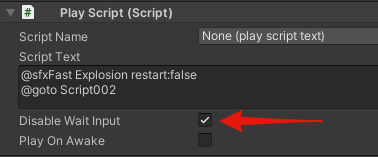
Disable Wait Inputoption toPlay Scriptcomponent allowing to disable waiting for input mode when the script is played. (example) - Added UI navigation focus support for generic HID gamepads.
- Added
Default Durationto the actor, camera and audio configurations allowing to set default duration of the modification commands; default value of thetimeparameter is no longer hard-coded. - Added
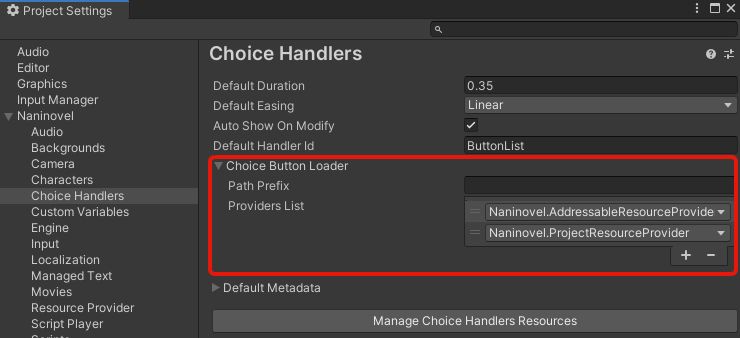
Choice Button Loaderproperty to choice configuration allowing to load custom button prefabs withoutResourcesAPI (eg, via addressable or any other resource provider). (example) - Added load progress indicator to loading and engine initialization UIs. (example)
- Video actors now fade the volume when changing appearances or hiding/showing.
- Text preview printer now accepts any implementations of
IRevealableTextinterface for better extensibility. - Script player will now attempt to find nearest playable inline index when loading state; will prevent crash when using localized scripts with extra commands, but could still lead to an undefined behavior (warning is logged in such cases).
- Most of the built-in async methods will now automatically handle async cancellation; it's no longer required to check for cancellation after awaiting such methods.
- Spreadsheet extension now supports organizing the scripts in subfolders.
- New line symbols (
\n) are now supported in managed text documents. @setcommand now supports compound assignment (+=,-=,/=,*=).- IDE extension will now show default parameter values. (example)
- IDE extension will now provide autocomplete for look direction parameter.
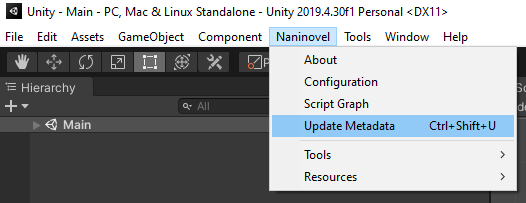
- It's now possible to update project metadata with a menu or a ctrl+shift+U hotkey. (example)
- Project metadata is now automatically generated and synced with IDE.
- IDE extension now shows currently played line and allows navigating scenario scripts. (guide)
- It's now possible to combine layered composition keys with expressions, eg
@char Miho.Uniform,Hair/Front>Short. - Spreadsheet extension now support long script names when
Single Spreadsheetis disabled. - It's now possible to use UI Toolkit as Naninovel UIs. (example)



Changed
- Minimum supported and recommended Unity version changed to 2019.4.30 due to a regression fix (#138).
- Changed movie player service and associated UI APIs. Instead of
OnMovieTextureReadyevent usePlayAsyncmethod to get the movie texture and assign it to the UI withSetMovieTexture; seeCommands/PlayMovie.csimplementation for example. - Removed
Clip Message Soundoption from character metadata configuration and text printers; selectOne Shot Clippedin the newly addedMessage Sound Playbackoption instead. - Changed async cancellation API:
CancellationTokenstruct has been renamed toAsyncToken,CancelASAPandCancelLazyproperties toCanceledandCompletedrespectively. When a token is canceledAsyncOperationCanceledexception will now be thrown. UniRx.Asyncusing is no longer required when usingUniTasktypes.- When creating a new naninovel script with a name that already exist in script resources, an error will be logged and script won't be created.
- Removed
Reveal SFXfrom text printers; use the newly added reveal events,Chars SFXor character message sounds. - Removed
IDE Metadatatool. The metadata is now automatically generated and synced with IDE (can be disabled in the engine configuration). - Renamed
IDE...attributes to...Context.
Fixed
- Fixed compatibility issues with Unity 2021.2
- Fixed revealable TMPro sprite shader (emoji will reveal correctly when emoji texture is assigned directly to the material; see UI project for example).
- Fixed (harmless) errors when generating localization scripts form other localization scripts with "Try Update" enabled and some of the target scripts missing.
- Fixed audio continue playing after hiding a video a...
Naninovel 1.16
Compatibility
Supported Unity versions range: from 2019.4.24 to 2020.3. Previous versions are not supported; compatibility issues with newer (major) versions will be addressed once they're out of beta.
Recommended Unity version: 2019.4.24.
Upgrade Guide
When importing the package to a project with Naninovel version 1.14 or older first follow v1.15 release upgrade guide, then continue with the following instructions:
- Remove
Naninovelfolder from the project before importing the updated package. - In case using extension packages, update them using following links:
- In case using sprite dicing, update the extension (remove and add it again in the package manager via the same git url).
Remember to keep NaninovelData/Resources folder and NaninovelData/EditorResources.asset file when updating the engine to preserve project configuration and asset references.
Be aware, that in-game saves (slots in save/load menu, values in settings menu and global game state) created with previous versions could cause unexpected behavior when loaded with the updated version; when patching a shipped project with a new Naninovel version, make sure existing saves work as expected.
In case using VS Code IDE extension, check for updates to handle changes in the commands API.
Added
- Added actor record assets allowing to manage actor metadata records (characters, backgrounds, printers, choice handlers) without using editor menus with support for multi-editing and organizing the records with folders. (example)
- Added
pos(scene position),position(world position),rotationandscaleparameters to@spawncommand allowing to specify transform of the spawned objects. - Added
ActorPopupproperty drawer attribute for drawing list of available actors in the Unity editor. - Added
GetNamebuilt-in expression function allowing to get display name of a character with the provided ID. - Added
@unloadScenecommand allowing to unload a Unity scene. - Added
@openURLcommand allowing opening specified URL with web browser. - Added
On Appearance ChangedUnity event to layered actor behavior component. - Added
Paste Current Compositioncontext menu item allowing to paste current layered composition expression. (example) - Added gyroscope bindings for camera look to the default input actions.
- Added
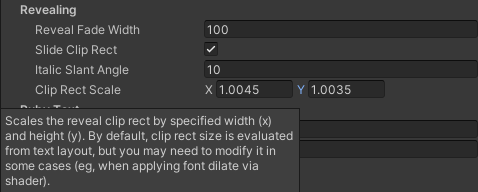
Clip Rect Scaleproperty to revealable TMPro text component allowing to modify the reveal rect size. (example) - Added
Default Skip Modeoption to script player config allowing to specify default text skip mode to set when the game is first started. - Added
On Initialization ProgressUnity event to "EngineInitializationUI" for listening progress changed events. - Added
On Tint ChangedUnity event to text printers allowing reacting to tint color set via@printercommand. (example) - Added
IScriptPlayer.HasPlayed(scriptName)method, allowing to check whether a script has been previously played. - Added
Play On Awakeproperty toPlay Scriptcomponent allowing to play the script automatically when the game object is instantiated. - Added
TMProChatbuilt-in printer. - Added
Naninovel TMPro Textcomponent — a wrapper over uGUI text mesh pro with ruby and tips tags and Arabic text support. - Added
removeparameter to@hide,@hideAlland@hideCharscommands allowing to remove (destroy) resources associated with the hidden actors; can be used instead of@resetStateto prevent memory leaks. - Added
Render Rectangleallowing to specify an area to render when using render actor to texture feature. - Added parameter for custom (dissolve texture) transition for smoothing (fuzzing) borders of the transition. (example)
- Naninovel scripts will now be automatically removed from the resources list when associated asset is deleted.
- Sprite dicing extension has been updated for better compression efficiency and speed; it now also possible specifying custom pivot in the diced sprites when
Keep Original(pivot) is enabled in the atlas settings. - Choice handler buttons will now invoke show/hide events in sync with handler itself allowing to attach a custom behavior when choice is shown/selected.
- Updated built-in TMPro printers to support conservative memory usage, which prevents GC allocations when printed text message length is above certain threshold. If you're using custom printers, disable
Vertex Buffer Auto Size Reductionon the TMPro text components manually. (ref issue) - Optimized script file watcher performance; only directories containing naniscripts will now be watched.
- It's no longer required to restart Unity editor when changing settings related to script file watcher.
- Resources path selection menu now supports sub-menus based on path hierarchy.
- Missing dependency error will now include type of the component that is missing the dependency.
- Game pad left stick will now also trigger focus when UI focus mode is set to navigation.
- Resource editor tooltips are now selectable to allow copy-pasting the script examples.
- It's now possible to import/export localization data into multiple spreadsheets.
- It's now possible using arbitrary enums to autocomplete parameters of custom commands. (guide)
- IDE extension now support comment folding.
- Spine extension now support multiple materials (submeshes).
- Improved layered actor auto render canvas evaluation.

Changed
- Minimum supported Unity version changed to 2019.4.24 due to breaking changes in TextMesh Pro package.
- "UniTask" third party library has been stripped and embedded inside Naninovel assembly. Upgrade script to v2 has been removed. UniTask v2 can now be used alongside default Naninovel installation.
- Service access methods in the
Engineclass have been changed:GetServiceno longer accepts a predicate, useFindServiceinstead;GetAllServiceshas been renamed toFindAllServices. - Removed
Correct Render Aspectoption. The aspect will now be corrected by default. To modify the rendered area (viewport), use the addedRender Rectangleproperty. (example)

Fixed
- Fixed author name missing in chat messages when display name is not set.
- Fixed resources assigned in editor menus and kept in
Resourcesfolder, but not under project provider root path not included to build. - Fixed exception being thrown when attempting to preview layered actor composition while not in prefab mode.
- Fixed exception when building with cloud build service with addressable system installed.
- Fixed addressable labels not automatically added on build.
- Fixed script parser not changing until recompile or editor restart.
- Fixed movie UI blinking white after fade when playing a video for the first time.
- Fixed non-generic
GetServicemethod not resolving services from interfaces. - Fixed auto play default input binding for gamepad fails to toggle the auto mode when using input system.
- Fixed quote un-/escaping in parameter values without whitespace.
- Fixed managed text records only applied to the first property in a type.
- Fixed TMPro font variants (weights) and sprites not working with text reveal effect.
- Fixed rotation applied to parent game objects in layered actors is ignored at runtime.
- Fixed entering skip mode prevents rollback to the command from which the skip started.
- Fixed editor resources lost when re-importing all assets or deleting "Library" folder.
- Fixed
@toastcommand not included to localization documents. - Fixed appearance and id parameters of
@backcommand not auto-completing for actors other than main (IDE extension). - Fixed engine pre- and post- initialization tasks not counting toward the reported initialization progress.
- Fixed text line incorrectly revealed when a ruby tag is placed at the end of a line.
- Fixed nullref when invoking
LayeredActorBehaviour.RebuildLayers()at runtime. - Fixed movie volume not affected by master volume setting.
- Fixed minor alpha blending artifacts when performing scene transitions.
- Fixed actors appear darker then they should be in semi-transparent areas.
- Fixed nullref when using preview composition of layered actor while gizmos are disabled.
- Fixed layered actor size distorted when using RebuildLayers method at runtime.
- Fixed title script labels not played when wait for input is enabled.
- Fixed expression function exceptions suppressed and not logged correctly.
- Fixed incorrect actor texture scaling when transitioning between appearances with different sizes.
- Fixed text incorrectly revealed and input indicator missing after saving game.
- Fixed duplicate rollback step added after loading a saved game.
Naninovel 1.15
Compatibility
Supported Unity versions range: from 2019.4.22 to 2020.3. Previous versions are not supported; compatibility issues with newer (major) versions will be addressed once they're out of beta.
Recommended Unity version: 2019.4.22.
Upgrade Guide
When importing the package to a project with Naninovel version 1.13 or older first follow v1.14 release upgrade guide, then continue with the following instructions:
- Remove
Naninovelfolder from the project before importing the updated package. - In case you're using extension packages, update them using following links:
- In case using a custom main camera prefab, set the desired orthographic size on the prefab (it's no longer set automatically when a custom camera is assigned). Automatically set size is evaluated as follows:
reference resolution height / PPU / 2; height is 1080 and PPU is 100 by default, so the default size is5.4. - With the addition of match mode option for the background actors, revise how existing backgrounds should be matched to the screen ratio. In case using custom background actors, that aren't supposed to stretch to the entire screen, disable the matching by settings the property to "Disabled". In case using generic backgrounds, see scale to match example.
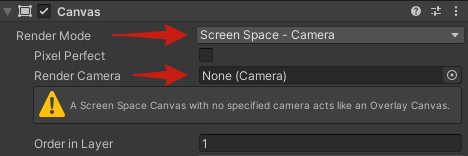
- Naninovel will no longer override UI render mode, so in case using custom or modified UIs and text printers, make sure
Render Modeis set toScreen Space - CameraandRender Camerafield is empty. (example) - If using new input system, update "Input System" package to version 1.1 via package manager.
- To use the newly added blur effect, add
Naninovel/Prefabs/FX/Blur.prefabto the spawn resources (Naninovel -> Resources -> Spawn). - In case using custom UIs inherited from built-in components, revise the prefabs configuration.
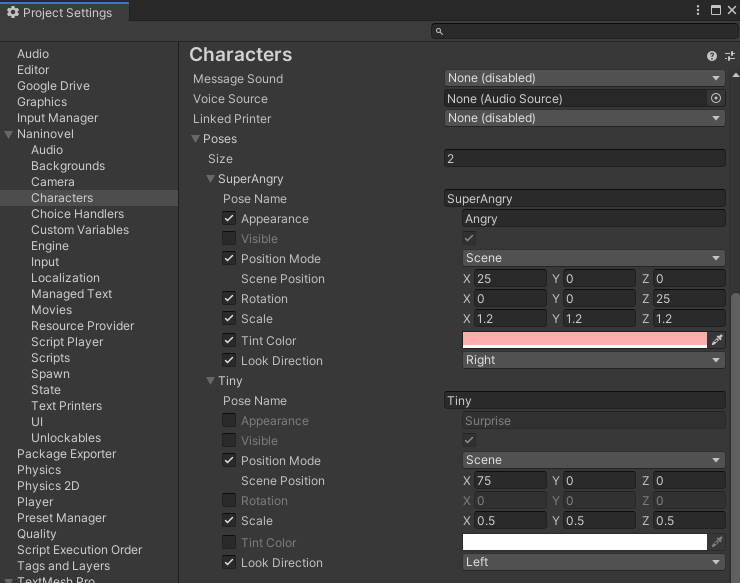
- In case using poses, revise which modifications should be applied by enabling corresponding toggle boxes. (example)
- In case using speaker highlight feature, re-setup the config using character poses. (example)
- To use the newly added Toast UI, add
Naninovel/Prefabs/DefaultUI/ToastUI.prefabto the UI resources (Naninovel -> Resources -> UI). - In case you've used quotes inside script expressions by double-escaping them, remove one escape symbol (single escape is enough now).
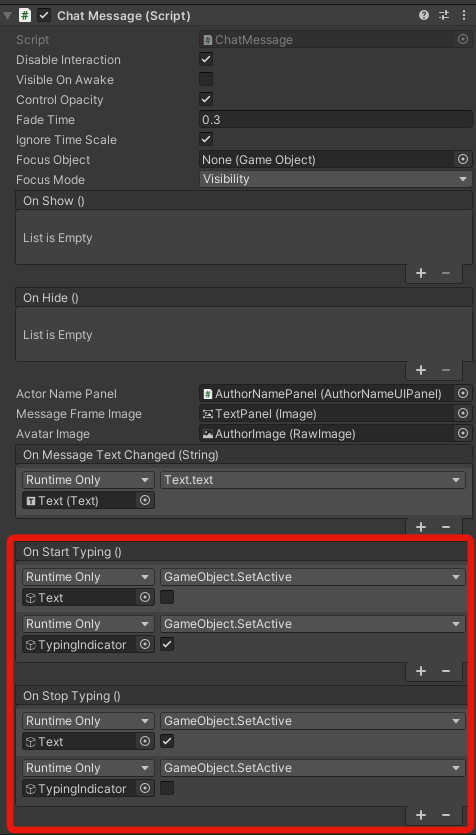
- In case using custom chat printer message prefab, setup the typing state (if necessary) using the newly added
OnTypeUnity events. (example)

Remember to keep NaninovelData/Resources folder and NaninovelData/EditorResources.asset file when updating the engine to preserve project configuration and asset references.
Be aware, that in-game saves (slots in save/load menu, values in settings menu and global game state) created with previous versions could cause unexpected behavior when loaded with the updated version; when patching a shipped project with a new Naninovel version, make sure existing saves work as expected.
In case you're using VS Code IDE extension, check for updates to handle changes in the commands API.
Added
- Added spreadsheet extension allowing to export/import localizable project data (scenario, managed text and all the associated localization documents) to/from an
.xlsxspreadsheet. (guide) - Added compatibility with Unity's new visual scripting solution. (guide)
- Added Spine character implementation. (guide)
- Added per-object blur FX. (guide)
- Added a toast UI and
@toastcommand allowing to show general-purpose self-hiding popup notifications aka "toasts". (guide) - Added an option to provide custom actor sprite shader, allowing to apply various lighting and surface effects. (guide)
- Added
Match Modeoption to the background actor configuration allowing to specify in which mode the actor should be matched against the screen resolution. (guide) - Added
Reference PPUproperty to the camera configuration allowing to control pixels per unit count when evaluating scene dimensions. - Added
Match Screen Widthoption to the camera configuration; when enabled, relative (scene) position evaluation will use screen border as the origin; otherwise a rectangle based on the reference resolution and PPU is used. - Added
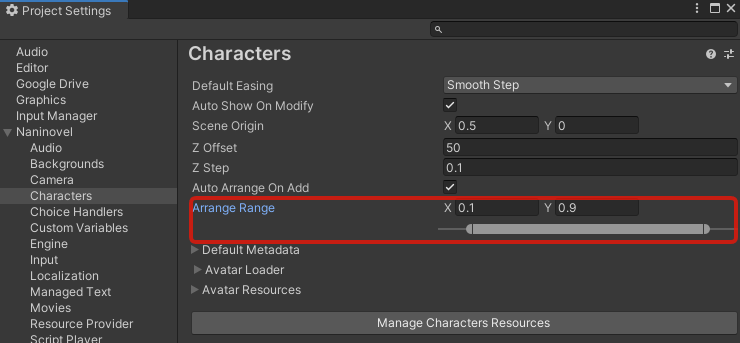
Arrange Rangeproperty to character manager configuration, allowing to specify the range (relative to scene width) in which the characters are distributed by default. (example) - Added
Update Delayproperty toReact To Aspect Ratiocomponent allowing to specify frequency of the updates. - Added
IsUnlocked()built-in expression function, allowing to check wither an unlockable item with the specified ID is currently unlocked. - Added video character implementation.
- Added detailed error description when an internal package asset is failed to load.
- Added
Default Fontoption to UI configuration, allowing to specify a font option to apply by default when the game is first started. - Added
Offsetproperty toRender Canvascomponent, allowing to specify an offset for the rendered layered or Live2D actor. - Added
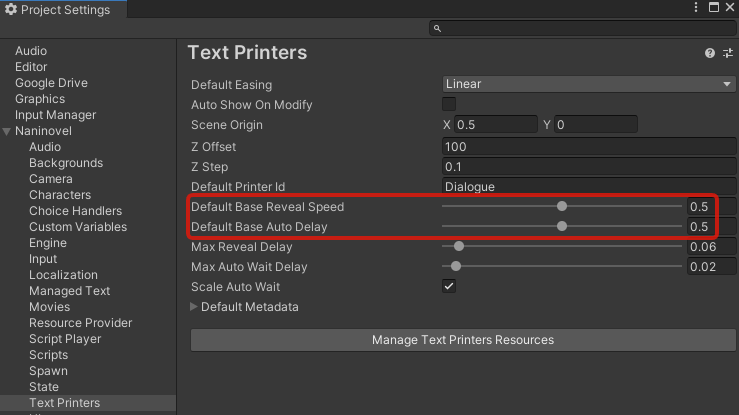
Default Base Reveal SpeedandDefault Base Auto Delayproperties to the text printers configuration, allowing to specify the related game settings values when the game is first started. (example) - Added
Voice Sourceproperty to character configuration, allowing to assign a dedicated audio source to be used when playing voice clips associated with the character. (example) - Added source and target language specs to the generated localization documents.
- Added
doparameter to@waitcommand, allowing to execute specified commands after a delay. The wait command now also supportswait:falsemode. - Added
Stop Voiceproperty to text printer actor configuration; when enabled, the printer will stop any playing voices on each print command. - Added
Activate On Moveto swipe input configuration, allowing to register the swipes while fingers are moved (disabled by default). - Added default swipe bindings for open backlog and toggle UI inputs.
- Added
Touch Distance Limitproperty to input configuration allowing to limit the touch distance when sampling input. - Added
On Clickedfor CG gallery slot prefab allowing to specify custom behavior when an unlocked gallery slot is clicked. - Added
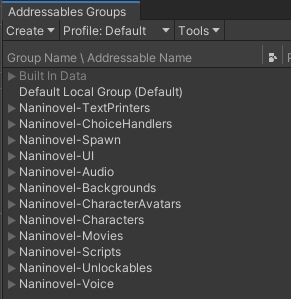
Group By Categoryoption to resource provider configuration, allowing to group addressable resources by category. (example) - It's now possible to select a custom script parser in scripts configuration menu; to create a custom parser, implement
IScriptParserinterface. (example) - It's now possible to localize text printers and choice handlers in the same way as all the other resources.
- It's now possible to generate localization documents for all the available localization in the project at once by specifying path to the localization root directory (
Resources/Naninovel/Localizationby default). (example) - It's now possible to provide custom implementation for audio player used by the audio manger service (selected in audio config).
- It's now possible to control z-position of text printer actors with
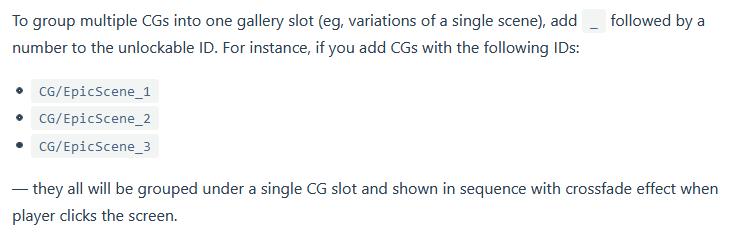
posparameter of@printercommand. - It's now possible to group multiple CG images into one gallery slot. (guide)
- It's now possible to selectively apply modifications in poses.
- It's now possible to modify chat message typing state without C# with the new
OnTypeevents added to the message prefab. - It's now possible to prevent Naninovel from unloading Unity objects assigned as resources with
IResourceProviderManager.Holdmethod. - It's no longer required to enable "keep original pivot" in diced sprite atlas.
- It's no longer required to double-escape quotes inside script expressions (single escape is enough).
- Optimized shader keyword usage: all the built-in shader keywords are now local and don't count to...


Naninovel 1.14
Compatibility
Supported Unity versions range: from 2019.4.7 to 2020.2. Previous versions are not supported; compatibility issues with newer (major) versions will be addressed once they're out of beta.
Recommended Unity version: Latest 2019.4 LTS release.
Upgrade Guide
When importing the package to a project with Naninovel version 1.12 or older first follow v1.13 release upgrade guide, then continue with the following instructions:
- Remove
Naninovelfolder from the project before importing the updated package. - In case you're using extension packages, update them using following links:
Remember to keep NaninovelData/Resources folder and NaninovelData/EditorResources.asset file when updating the engine to preserve project configuration and asset references.
Be aware, that in-game saves (slots in save/load menu, values in settings menu and global game state) created with previous versions could cause unexpected behavior when loaded with the updated version; when patching a shipped project with a new Naninovel version, make sure existing saves work as expected.
In case you're using VS Code IDE extension, check for updates to handle changes in the commands API.
Added
- It's now possible to select voice language independently of the main localization in the game settings menu. (guide)
- Unused resources are now automatically released when navigating between naninovel scripts (via
@gotocommand); state reset is no longer required. - Improved CG gallery resource management: only the items displayed on the current page will load; previously, all the CG items were preloaded on opening the gallery, which caused freeze with large amounts of CG resources.
- IDE extension now provides completion for expression functions and custom variables.
- Added an option to affect all camera components (via
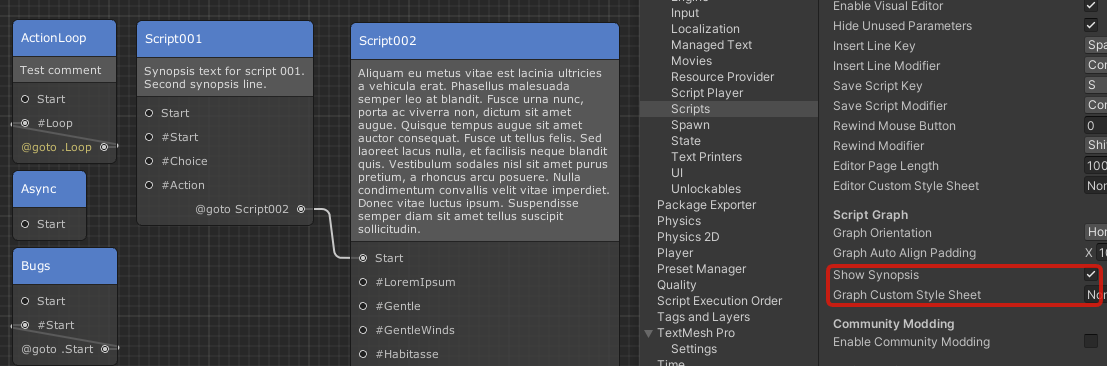
*symbol) fortoggleandsetparameters of@cameracommand. - Added script graph synopsis: first comment lines in the naninovel scripts will now be added to the script nodes, representing scenario synopsis. Can be disabled via
Show Synopsisproperty in the script configuration. (example) - Added an option to specify non-uniform (x,y,z) scale with
@animatecommand.
Changed
Reset On Goto(state configuration) is now disabled by default for new projects. Consider disabling the option for existing projects as well, as the unused resources are now automatically released when navigating between naninovel scripts and state reset is no longer required. Don't forget to removeresetparameters in the@gotocommands after disabling the option.
Fixed
- Fixed state manager initializing sooner then expected.
- Fixed Rollback UI saving visibility state by default, which cause inconsistent behavior of the UI when rolling back.
- Fixed scene transitions disabling skip and auto play modes.
- Fixed
@despawncommand not printing script position on warnings. - Fixed IDE extension not recognizing script expressions inside generic text lines, which contains inlined commands.
- Fixed CG gallery not updating item unlock status while the UI is opened.
- Fixed depth of field effect flickering on despawn.
- Fixed some spawned FX (eg, dof, rain, snow, sun shafts) gradually revealing after loading a game, while they're expected to be fully revealed.
- Fixed state rollback stack reset on goto preventing from rolling back to the previously played script.
- Fixed UI resources referenced in script commands using prefab names instead of resource names.
- Fixed incorrect color of the comment lines in the visual script editor when using dark editor scheme.
- Fixed nullref exceptions when editing TMPro printer prefabs in play mode.
- Fixed script lines searcher navigation in Unity 2020.2.
- Fixed look camera mode not working correctly when using camera offset.
- Fixed "shake" FX and
@animationcommand freeze editor when running in a loop. - Fixed numeric values parsing in IDE extension on non-English OS locales.
Naninovel 1.13
Compatibility
Supported Unity versions range: from 2019.4.7 to 2020.2. Previous versions are not supported; compatibility issues with newer (major) versions will be addressed once they're out of beta.
Recommended Unity version: Latest 2019.4 LTS release.
Upgrade Guide
When importing the package to a project with Naninovel version 1.11 or older first follow v1.12 release upgrade guide, then continue with the following instructions:
- Remove
Naninovelfolder from the project before importing the updated package. - In case you're using extension packages, update them using following links:
- In case you're using a custom "ChatMessage" prefab for built-in chat printer, assign
OnMessageTextChangedUnity event for the prefab. (example) - In case you're using a custom
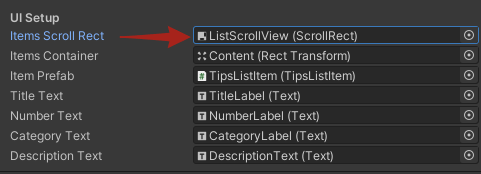
ITipsUIwith built-in implementation, assignItems Scroll Rectproperty. (example) - In case you're using a custom "SaveLoadSlot" prefab, assign
Empty Slot Thumbnailproperty. - In case you've removed
com.unity.textmeshpropackage (added by default when creating a new Unity project), add it back, as Naninovel will no longer compile without the package. - In case you're using custom metadata types, remove the attribute from the implementations and inherit them from
CustomMetadata<>. Be aware, that values of the custom metadata properties will be lost after the changes, so make sure to backup them. - In case using a custom actor implementation, apply
ActorResourcesattribute and revise how the resources are loaded: if the implementation uses multiple resources, add the attribute and set second argument true, otherwise change path of the loaded single resource to be equal to the actor ID. - In case using custom preloadable commands or actor implementations with overridden
Hold/ReleaseResourcesmethods, change the signature of the hold and release methods to comply with the new interface. (example) - In case you've used a sprite characters without appearances to represent a narrator, switch to
NarratorCharacterimplementation (sprite implementations will now show a special texture when an appearance is missing). - In case using any custom types under a non-predefined assembly (via .asmdef files) to extend or override engine behavior (eg, actor implementations, serialization handlers, custom configurations, etc), add the assembly name to the
Type Assemblieslist property found in the engine configuration menu. - In case using custom configurations, apply
EditInProjectSettingsattribute if you need the associated project settings menu. - Run
Naninovel -> Upgrade -> v1.12 to v.13upgrade script.

Remember to keep NaninovelData/Resources folder and NaninovelData/EditorResources.asset file when updating the engine to preserve project configuration and asset references.
Be aware, that in-game saves (slots in save/load menu, values in settings menu and global game state) created with previous versions could cause unexpected behavior when loaded with the updated version; when patching a shipped project with a new Naninovel version, make sure existing saves work as expected.
In case you're using VS Code IDE extension, check for updates to handle changes in the commands API.
Added
- IDE extension for VS Code is now available. (guide)
- It's now possible to render character and background actors to render texture assets assigned in configuration; supported by all the implementations, except generic. (guide)
- It's now possible to execute commands via title script before starting a new game, exiting game or loading a game with
OnNewGame,OnExitandOnLoadlabels. (guide) - It's now possible to associate printed text with tips to auto unlock them and show tips UI when the associated text clicked. (guide)
- It's now possible to specify y and z coordinates with
fromandtoparameters of@slidecommand. - It's now possible to disable opacity hover of grid slots (CG, save-load, etc), by setting
Hover Opacityto zero. - It's now possible to assign asset references to custom metadata.
- It's now possible to assign script expression to display name. (guide)
- It's now possible to override built-in configuration editors (Naninovel project settings menus). (guide)
- Improved script line searcher styling for better visibility when using dark Unity editor skin.
- Improved engine initialization and localization change times by using a stripped version of the domain types.
- Improved performance when state rollback is disabled (controlled via state configuration menu). The engine will no longer perform full serialization on each played command, which was previously required to save the game; this significantly reduce GC allocations and saves CPU time when playing scripts with rollback disabled.
- Added support for Unity 2020.2.
- Added "DicedSpriteBackground" background actor implementation; configured and used in the same way as diced characters.
- Added support for direct interaction (eg, raycasting) with the models of Live2D character implementation.
- Added
ActorResourcesattribute, allowing to specify resource type constraint and whether an actor implementation is allowed to have multiple resources assigned in configuration menu. - Added
NarratorCharacterimplementation for character actors that doesn't have any presence on scene and can be used to represent a narrator (author of the printed text messages). - Added
EditInProjectSettingsattribute; when the attribute is applied to a configuration implementation, the associated project settings editor menu will be added. - Added
PrintFrameDelayproperty to text printer metadata allowing to specify number of frames to wait before completing@printcommands; a value greater than zero is required to make the printed text visible while in skip mode. - Added
Type Assemblieslist property to the engine configuration menu allowing to specify which assemblies will be scanned when looking for actor implementations, serialization handlers, managed text, etc. - Added
OnMessageTextChangedUnity event toChatMessagecomponent, allowing to use it with any types of text. - Added
AudioListenerproperty getter toIAudioManagerinterface, allowing to access audio listener component currently used by the engine. - Added managed text records for the graphic options.
- Added
On Started SpeakingandOn Finished Speakingevents for layered character behavior allowing to set up lip sync. - Added a
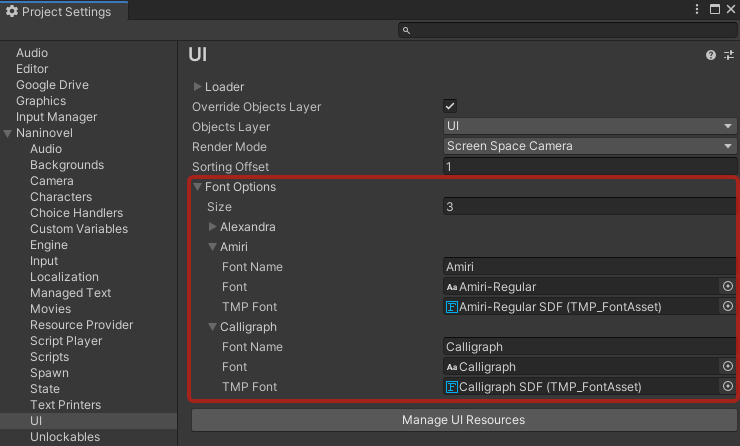
Font Optionslist property in the UI configuration allowing to specify which fonts should be available for the player to choose from in the game settings UI. (example) - Added default option of the font dropdown setting to the auto generated "DefaultUI" managed text document.
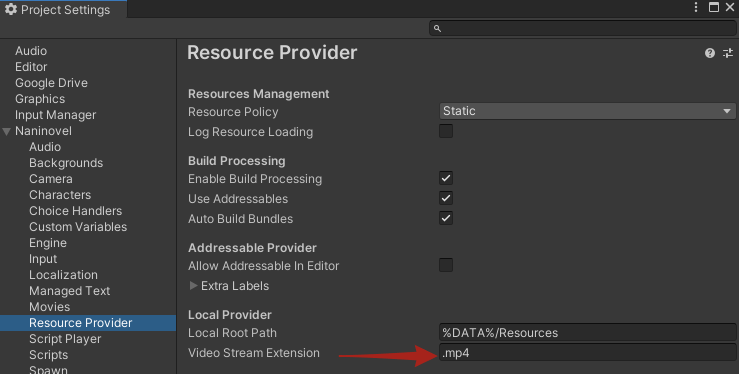
- Added an option to specify file extension of the video assets (movies, video backgrounds) streamed under WebGL. (example)
- Added an option to prevent specific printers from adding messages to the backlog. (example)
- Added an option for a text printer to always split messages added to backlog; enabled by default for the built-in chat printer.
- Added extension methods for custom variable manager allowing to get/set variables with float, int and bool value types.
- Added a default actor appearance shown when referencing a non-existing actor via naninovel scripts.
- Added
Render Canvascomponent allowing to specify custom render canvas size for layered actors. - Added concurrent invocations support for
RuntimeInitializer.InitializeAsync()method. - Added
@sfxFastcommand allowing to play transient SFX audio clips (eg, viaPlay Scriptcomponent in reaction to UI events); the command also allows playing the same clip concurrently multiple times withadditiveparameter. - Added
Scene Independentoption to the engine configuration menu; when disabled, the engine objects will become part of the scene the engine was initialized at and will be destroyed when the scene is unloaded. - Added
Dynamic Loadproperty to the CG gallery UI; when disabled, all the CG resources will be preloaded on initialization instead of loading only the resources for the current CG gallery page.

Changed
- TMPro (
com.unity.textmeshpro) package is now a require...
Naninovel 1.12
Compatibility
Supported Unity versions range: from 2019.4.7 to 2020.1. Previous versions are not supported; compatibility issues with newer (major) versions will be addressed once they're out of beta.
Recommended Unity version: Latest 2019.4 LTS release.
Upgrade Guide
When importing the package to a project with Naninovel version 1.10 or older first follow v1.11 release upgrade guide, then continue with the following instructions:
- Remove
Naninovelfolder from the project before importing the updated package. - In case you're using extension packages, update them using following links:
- Update TextMeshPro (
com.unity.textmeshpro) to the verified version via package manager. - In case using SpriteDicing extension, update it and regenerate the atlases (make sure to enable "Keep Original Pivot" in atlas config).
Remember to keep NaninovelData/Resources folder and NaninovelData/EditorResources.asset file when updating the engine to preserve project configuration and asset references.
Be aware, that in-game saves (slots in save/load menu, values in settings menu and global game state) created with previous versions could cause unexpected behavior when loaded with the updated version; when patching a shipped project with a new Naninovel version, make sure existing saves work as expected.
In case you're using Atom IDE extension, check for updates to handle changes in the commands API. Should the extension fail to work after the update, try manually deleting the extension directory and installing it again; re-installing Atom itself could also resolve the issue.
Added
- Added an option in UI configuration menu to disable override of the managed UIs object layer.
- Added
Render Materialproperty toLayered Actor Behaviorcomponent, allowing to use a single custom material when rendering the layers. - Added
Reversedproperty toLayered Actor Behaviorcomponent, allowing to render the layers in reversed order. - Added an upgrade script for UniTask v2.
- Added
IInputIndicatorinterface allowing to provide an arbitrary "waiting for input indicator" object implementation. - Added dark skin for visual script editor; enabled when Unity editor is using "Professional" theme.
- It's now possible to inject custom data to actors metadata.
- It's now possible to copy and paste lines in visual script editor.
- It's now possible to override all the public and protected members of the built-in engine service implementations.
- It's now possible to rewind by clicking a line in visual script editor, while holding
Shiftkey (can be configured in script configuration). - It's now possible to use any renderers derived from
UnityEngine.Rendereras layers in layered actor implementations. - SunShafts, Rain and Snow built-in FX now have a proper fade-out animation when despawned.
Changed
- Due to
com.unity.textmeshproverified status in Unity 2019.4.7 release has been changed to a newer version, which has breaking changes, minimum Unity version supported by Naninovel has also changed to 2019.4.7. - When
Render Materialis not assigned, layered actor behavior will now use material from layer renderer component instead of a single predefined material; this allows assigning different materials for specific layers.
Fixed
- Fixed state manager loading settings and global state later than expected.
- Fixed an unnecessary error logged when attempting to remove a non-managed UI.
- Fixed input indicator positioned incorrectly when reveal speed is set to max value (instant).
- Fixed custom dissolve appearance transitions failing to rollback properly.
- Fixed built-in searcher scripts conflicting with
com.unity.searcherpackage. - Fixed layered actors inconsistent render state when rolling back during appearance transition.
- Fixed TMPro text printers excessive material assignments.
- Fixed list record in editor menus deleted when "Delete" key is pressed while editing record's text field.
Naninovel 1.11
Compatibility
Supported Unity versions range: from 2019.3 to 2020.1. Previous versions are not supported; compatibility issues with newer (major) versions will be addressed once they're out of beta.
Recommended Unity version: Latest 2019.4 LTS release.
Upgrade Guide
When importing the package to a project with Naninovel version 1.9.8-beta or older first follow v1.10 release upgrade guide, then continue with the following instructions:
- Remove
Naninovelfolder from the project before importing the updated package. - In case you're using extension packages, update them using following links:
- In case using custom text printers, add continue input triggers to the new
Continue Input Triggerslist property. - In case using Naninovel's async API in custom scripts, resolve ambiguity of
cancellationTokenarguments by removingSystem.Threadingusage or specifying full name for the argument:Naninovel.CancellationToken; example video.
Remember to keep NaninovelData/Resources folder and NaninovelData/EditorResources.asset file when updating the engine to preserve project configuration and asset references.
Be aware, that in-game saves (slots in save/load menu, values in settings menu and global game state) created with previous versions could cause unexpected behavior when loaded with the updated version; when patching a shipped project with a new Naninovel version, make sure existing saves work as expected.
In case you're using Atom IDE extension, check for updates to handle changes in the commands API. Should the extension fail to work after the update, try manually deleting the extension directory and installing it again; re-installing Atom itself could also resolve the issue.
Added
- Added support for Unity 2020.1.
- Added
Animatedproperty to layered actor behavior component; when enabled, the actor will be rendered each frame allowing to animate the layers or implement other dynamic behavior. - Added
Goto.DontResetattribute; when applied to an engine service implementation, the service won't be reset by default while executing@gotocommand. - Added support for right to left (arabic) text reveal effect (TMPro printers only).
- Added
Font Change Configurationproperty to the managed UI components, allowing to configure which text components should be affected by font and text size settings (set by player via in-game settings menu); it's also possible to specify font sizes for individual text elements. - Added an utility to generate metadata for custom commands allowing to support them in IDE extensions (eg, Atom).
- Added
playparameter to@choicecommand, allowing to control whether the script should continue playing after the choice is picked when neithergotonorgosubparameters are specified (enabled by default). - Added an auto voice mode to associate voice clips by content instead of command playback spot.
- Added
onlyparameter to@resetStatecommand, allowing to reset only the provided services. - Added
Complete On Continueproperty to script player configuration, allowing to control whether to instantly complete blocking (wait:true) commands performed over time (eg, animations, hide/reveal, tint changes, etc) whenContinueinput is activated; enabled by default. - It's now possible to rollback via backlog UI by clicking a button next to backlog message; the feature can be disabled via
Allow Rollbackproperty in backlog UI. - It's now possible to disable replay voice feature in printer backlog UI via
Allow Replay Voiceproperty. - It's now possible to mute/un-mute individual input samplers with
setparameter of@processInputcommand; eg:@processInput set:Rollback.false,Pause.false,Continue.true. - It's no longer required to restart the game when setting default font type or size in game settings menu.
- It's now possible to setup multiple continue input triggers for a text printer.
- It's now possible to control voice volume of specific characters.
- It's now possible to override built-in commands.
- Improved
@resetStatecommand performance when a service filter is used.
Changed
- Blocking (
wait:true) commands performed over time (eg, animations, hide/reveal, tint changes, etc) are now instantly completed whenContinueinput is activated; can be disabled in script player configuration viaComplete On Continueproperty. - Changed type of
cancellationTokenarguments used in async Naninovel's API fromSystem.Threading.CancellationTokentoNaninovel.CancellationToken. - Anchor for
ButtonAreabuilt-in choice handler content is now centered to prevent buttons from moving when changing display aspect ratio. - Script will now automatically continue playing by default when
doparameter is assigned in@choicecommand, unlessplayparameter is set to false. - Text font size (in game settings menu) is now a dropdown instead of slider.
- Text font and size (in game settings menu) no longer affect all the text elements by default; individual text elements of the UI (including custom UIs), that should be affected by the setting can now be specified via
Font Change Configurationproperty. Continue Input Triggerproperty of text printers has been replaced withContinue Input Triggers(list) to allow adding multiple objects.- Chat text printer no longer reset by default (only affect new projects).
- Changed unloaded resource object field visual style to be more similar to normal object field.
- Third party NCalc library has been updated to the latest version.
Fixed
- Fixed layered actors sometimes not rendered properly when scaled.
- Fixed some resources unloaded while being used.
- Fixed bubble printers have incorrect position when display aspect ratio changes.
- Fixed
resetparameter of@gotocommand not working with types outside of "Naninovel" namespace. - Fixed
@resetStatecommand not resettingICustomVariableManagerservice when no parameters are specified. - Fixed built-in TMPro printers using incorrect font shader for author name text labels.
- Fixed author avatar images inside TMPro printers failing to crossfade correctly.
- Fixed camera rotation over negative values.
- Fixed some text printer and choice handler resources not disposed correctly.
- Fixed default voice volume property in audio config ignored when starting a new game.
- Fixed missing ref exception sometimes throwing in editor when closing script graph window.
- Fixed skippable wait timer (eg,
@wait i3) not behaving correctly when used before or after a generic text line. - Fixed script localization failing when localized lines with equal content exist.
- Fixed backlog messages ignoring authors when using chat printer.
Naninovel 1.10
Compatibility
Minimum supported Unity version: 2019.4 Previous versions are not supported; any issues with newer versions will be addressed in the next releases or patches. Recommended version: Latest 2019.4 LTS release.
Upgrade Guide
When importing the package to a project with Naninovel version 1.9.7-beta or older first follow v1.9.8 release upgrade guide, then continue with the following instructions:
- Remove
Naninovelfolder from the project before importing the updated package. - In case you're using extension packages, update them using following links:
- In case you've used
positionparameter in character or background poses, reset it. - In case you've used
On Is Speaking ChangedUnity event of generic character behavior, re-setup the lip sync using newly addedOn Started SpeakingandOn Finished Speakingevents. - Run upgrade script via
Naninovel -> Upgrade -> v1.9.8-beta to v1.10editor menu to automatically perform required changes to the configuration assets.
Remember to keep NaninovelData/Resources folder and NaninovelData/EditorResources.asset file when updating the engine to preserve project configuration and asset references.
Be aware, that in-game saves (slots in save/load menu, values in settings menu and global game state) created with previous Naninovel versions could cause unexpected behavior when loaded with the updated version.
In case you're using Atom IDE extension, check for updates to handle changes in the commands API. Should the extension fail to work after the update, try manually deleting the extension directory and installing it again; re-installing Atom itself could also resolve the issue.
Added
@showUIand@hideUIcommands now have an optionaltimeparameter to control duration of the animation.- Added an option to create duplicates of the built-in UIs via
Create -> Naninovel -> Default UI -> ...assets context menu. - Added an option to choose between world and scene space when setting position in character and background poses editor.
- Added
setparameter to@cameracommand allowing to explicitly enable/disable components (special effects). - Added
Allow Addressable In Editorproperty to resource provider configuration menu allowing to control whether to use addressable provider in editor (disabled by default). - Added an option (enabled by default) to strip text formatting tags from printer backlog messages.
- Added default input actions for input system.
- Added PlayerPrefs serialization backend option (can be selected in state configuration menu).
- Added
reloadconsole command allowing to manually perform hot reload of the currently played naninovel script. - Added an option to store choice summary in printer backlog (enabled by default). To disable the feature or change the formatting, use corresponding options in the printer backlog UI.
- It's now possible to assign multiple resources to custom character, text printer and choice handler implementations via editor menus.
- It's now possible to use commas in list command parameter values by escaping them; eg
@choice "Arrange" do:"@sfx Click, @arrange k.10\,y.55" @choicecommand now supportgosubparameter allowing navigating to a sub-routine when picked.@choicecommand now supportdoparameter allowing to execute arbitrary commands when picked.
Changed
- Removed obsolete "Define" item in visual editor's add line menu.
- Position in character and background poses editor is now specified in world units by default.
- Rotation in character and background poses editor is now specified in Euler angles instead of Quaternion.
On Is Speaking ChangedUnity event of generic character behavior has been replaced withOn Started SpeakingandOn Finished Speakingevents to allow more straightforward setups.StateSlotManagerrenamed toIOStateSlotManagerto differentiate with the newly added PlayerPrefs serialization handler.
Fixed
- Fixed
OnIsSpeakingChangedevent of generic characters not stopped correctly when using auto voicing, activating skip or continue inputs. - Fixed
wait:falseignored when playing commands inPlay Scriptcomponent. - Fixed command skipping when picking a choice without a
gotoparameter assigned while the player is not stopped. - Fixed nullref exception when using
@bgmand@sfxwithout nameless parameters. - Fixed wait for input activated two times when a generic text line ends with
[i]. - Fixed ruby text clipping wrapped words.
- Fixed nullref exception when specified type name in
resetparameter of@gotoand@gosubcommands is not found. - Fixed development console not disabled correctly when corresponding option is set in the configuration menu.
- Fixed
Generated Data Pathin engine configuration lost when opening Unity project on a different machine. - Fixed hot reload not working when modified script is not added to the script resources manager.